[mit6.1810]Lab1: Utilities

【写在前面】

这是2023-2024春季学期操作系统课程有关xv6 lab部分的实验报告,参考了很多网络资源,解释也不一定正确,仅作为留档,参考需谨慎。

Lab 地址:6.1810 / Fall 2023

参考:MIT 6.S081_Zheyuan Zou的博客-CSDN博客

sleep

应用层

sleep 程序中,用户通过命令行输入一个时间参数,程序调用 sleep 系统调用使当前进程暂停指定的时间。

1
2
time = atoi(argv[1]); // 将字符串参数转换为整数
sleep(time); // 调用 sleep 系统调用,使进程暂停

系统调用

sleep 被调用时,它是一个系统调用,会触发一个上下文切换,从用户空间切换到内核空间。

  • 上下文切换:保存当前进程的上下文(包括寄存器状态、程序计数器等),并加载内核的上下文。
  • 系统调用处理:内核接收到 sleep 系统调用后,会将当前进程的状态设置为 SLEEPING,并将其加入到等待队列中。

内核内部

在内核中,sleep 系统调用的处理如下:

  1. 设置进程状态:

    1
    
    current->state = SLEEPING;
    

    将当前进程的状态设置为 SLEEPING,表示该进程正在等待某个事件(在这里是时间到期)。

  2. 加入等待队列:

    1
    
    sleep_on(&ticks);
    

    将当前进程加入到等待队列中。ticks 是一个全局变量,表示系统启动后的时钟滴答数。

  3. 调度器: 内核的调度器会检查等待队列中的进程。如果进程的等待时间已到(ticks >= current->wakeup),则将其从等待队列中移除,并将其状态设置为 RUNNABLE

  4. 唤醒进程: 当进程的等待时间到期后,调度器会将其唤醒,重新加入到就绪队列中,等待被调度运行。

线程切换

sleep 的过程中,内核会切换到其他就绪的进程运行。具体步骤如下:

  1. 保存上下文:保存当前进程的上下文。
  2. 选择下一个进程:调度器选择一个就绪的进程。
  3. 恢复上下文:恢复新进程的上下文。
  4. 切换执行:开始执行新进程。

完整代码

 1
 2
 3
 4
 5
 6
 7
 8
 9
10
11
12
13
14
15
16
17
18
19
20
21
22
23
#include "kernel/types.h"
#include "kernel/stat.h"
#include "user/user.h"

int
main(int argc,char* argv[])
{
    int time;
    if(argc==1){ // 只输入了一个“sleep”
        printf("Please enter a parameter!\n");
        exit(1); // 终止当前进程 无返回
    }
    else if(argc>2){ // 参数过多
        printf("Enter too many parameters!\n");
        exit(1);
    }
    time = atoi(argv[1]); // atoi()用于将字符串转化为整数,argv[1]为第二个输入
    sleep(time);
    exit(0);
}
// grade-lab-util 是实验环境提供的工具,用于自动化测试和评分
// 测试一下util实验中sleep函数的正确性,在终端输入:
// ./grade-lab-util sleep

pingpong

应用层

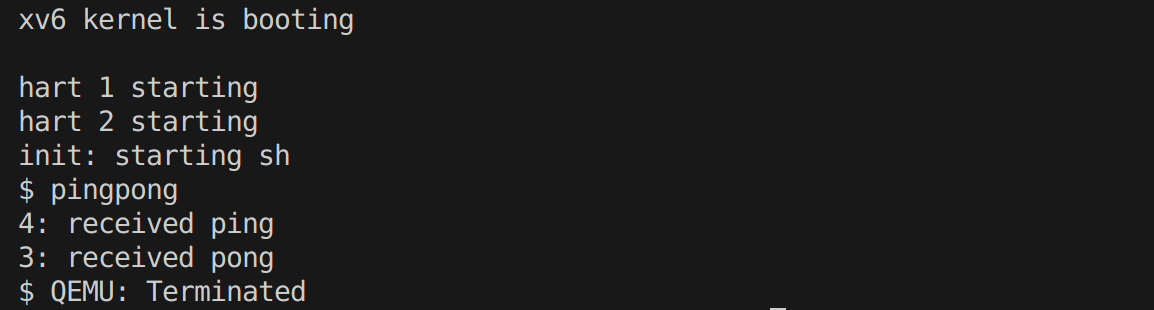
pingpong 程序通过父子进程之间的管道通信实现简单的消息传递。

1
2
3
4
5
6
pipe(p); // 创建管道
if (fork() == 0) { // 子进程
    // 子进程从管道读取数据,然后写入数据
} else { // 父进程
    // 父进程写入数据,然后从管道读取数据
}

系统调用

  • pipe 系统调用:

    1
    
    pipe(p);
    

    创建一个管道,返回两个文件描述符:p[0] 用于读取,p[1] 用于写入。

  • fork 系统调用:

    1
    
    fork();
    

    创建一个子进程。子进程继承父进程的文件描述符。

  • readwrite 系统调用:

    1
    2
    
    read(p[0], &receive, 1);
    write(p[1], &send, 1);
    

    这些调用在父子进程之间传递数据。

内核内部

  1. pipe 的实现:内核分配一个管道结构体,包含两个文件描述符。设置文件描述符的读写指针。
  2. fork 的实现:创建一个新进程,复制父进程的内存空间和文件描述符。新进程的初始状态为 RUNNABLE
  3. readwrite 的实现:
    • write:将数据写入管道的缓冲区。
    • read:从管道的缓冲区读取数据。如果没有数据可读,进程会被阻塞,直到有数据可用。

线程切换

pingpong 程序中,父子进程之间的通信会触发线程切换:

  1. 父进程写入数据:父进程调用 write,将数据写入管道。如果管道缓冲区已满,父进程会被阻塞。
  2. 子进程读取数据:子进程调用 read,从管道读取数据。如果管道缓冲区为空,子进程会被阻塞。
  3. 调度器的作用:调度器会根据进程的状态(RUNNABLESLEEPING)选择合适的进程运行。当一个进程被阻塞时,调度器会切换到另一个就绪的进程。

完整代码

 1
 2
 3
 4
 5
 6
 7
 8
 9
10
11
12
13
14
15
16
17
18
19
20
21
22
23
24
25
26
27
28
29
30
#include "kernel/types.h"
#include "kernel/stat.h"
#include "user/user.h"

int
main(int argc,char* argv[])
{
    int p[2]; // 管道的两个文件描述符
    pipe(p); // 创建一个管道
    if(fork()==0){ // 子进程
        char send='a';
        char recevie;
        read(p[0],&recevie,1); // 在没有接收到数据之前,子进程会被阻塞在此
        fprintf(1,"%d: received ping\n",getpid());
        write(p[1],&send,1);
    }

    else{ // 父进程
        char send='b';
        char receive;
        write(p[1],&send,1);
        wait(0); // 等待子进程结束之后再读出子进程的数据,否则可能自发自收
        read(p[0],&receive,1);
        fprintf(1,"%d: received pong\n",getpid());
    }

    close(p[0]); // 关闭文件描述符
    close(p[1]);
    exit(0);
}

find

应用层

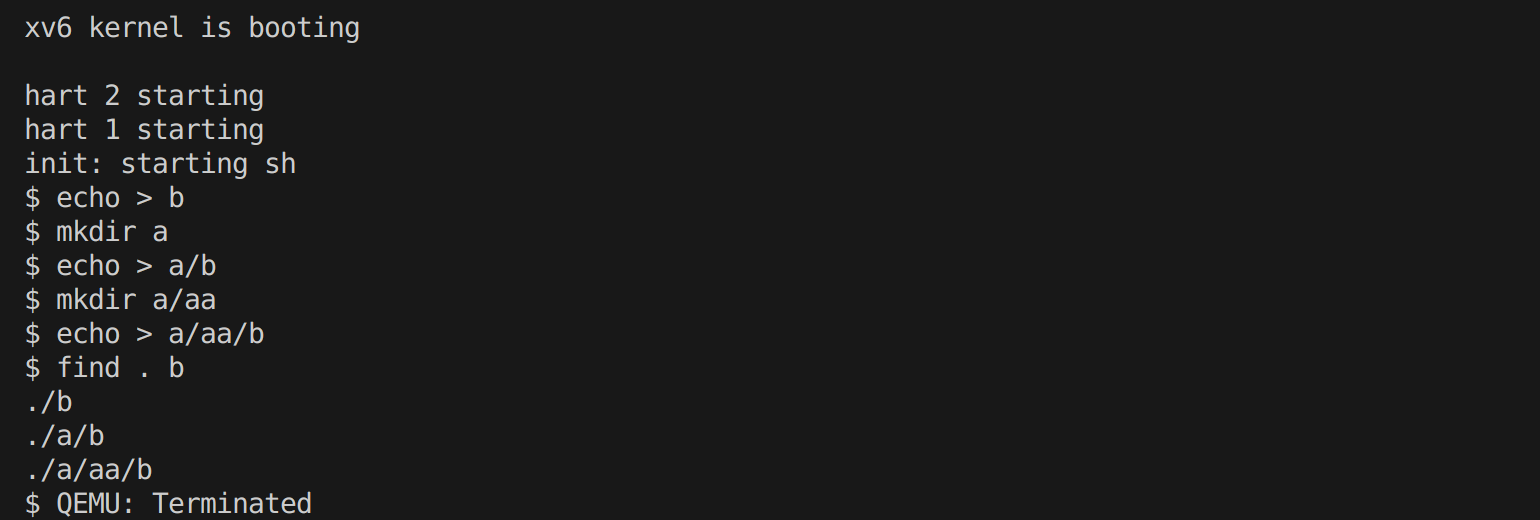
find 程序通过递归搜索目录,查找指定的文件名。

1
find(argv[1], argv[2]);

系统调用

  • open 系统调用:

    1
    
    open(path, 0);
    

    打开一个目录或文件,返回一个文件描述符。

  • read 系统调用:

    1
    
    read(fd, &de, sizeof(de));
    

    从目录文件描述符中读取目录项。

  • stat 系统调用:

    1
    
    stat(buf, &st);
    

    获取文件或目录的状态信息。

内核内部

  1. open 的实现:内核查找路径对应的文件或目录。分配一个文件表项,设置文件描述符。
  2. read 的实现:内核从目录文件中读取目录项。如果目录项为空,返回 0。
  3. stat 的实现:内核查找路径对应的文件或目录。返回文件或目录的状态信息,包括类型、大小等。

线程切换

find 程序中,主要涉及文件系统操作,线程切换较少。但如果文件系统操作阻塞(如磁盘 I/O),调度器会切换到其他就绪的进程。

完整代码

 1
 2
 3
 4
 5
 6
 7
 8
 9
10
11
12
13
14
15
16
17
18
19
20
21
22
23
24
25
26
27
28
29
30
31
32
33
34
35
36
37
38
39
40
41
42
43
44
45
46
47
48
49
50
51
52
53
54
55
56
57
58
59
60
61
62
63
64
65
66
67
68
69
70
71
72
73
74
#include "kernel/types.h"
#include "kernel/stat.h"
#include "user/user.h"
#include "kernel/fs.h"
#include "kernel/fcntl.h"

void find(char* path, char* filename)
{
	char buf[512], *p;
	int fd;
	struct dirent de;
	struct stat st;

	if((fd = open(path, 0)) < 0){
	fprintf(2, "find: cannot open %s\n", path);
	return;
	}

	//fstat() 用来将参数filedes 所指向的文件状态复制到参数buf 所指向的结构
	if(fstat(fd, &st) < 0)	{
		fprintf(2, "find: cannot stat %s\n", path);
		close(fd);
    	return;
  	}

	//参数错误
	if (st.type != T_DIR) {
		fprintf(2, "usage: find <DIRECTORY> <filename>\n");
		return;
	}
	
	switch(st.type){
    case T_FILE:
        fprintf(2, "find: you are supposed to search for a file in a directory rather than a file \n");
        break;

    case T_DIR:
        if(strlen(path) + 1 + DIRSIZ + 1 > sizeof buf){
            printf("find: path too long\n");
            break;
        }
        strcpy(buf, path);
        p = buf+strlen(buf);
        *p++ = '/';
        while(read(fd,&de,sizeof(de)) == sizeof(de)){
            if(de.inum == 0)
			    continue;
	        memmove(p, de.name, DIRSIZ);
	        p[DIRSIZ] = 0;
	        if(stat(buf, &st) < 0) {
		        printf("find: cannot stat %s\n", buf);
		        continue;
            }
            //不要在“.”和“..”目录中递归
	        if (st.type == T_DIR && strcmp(p, ".") != 0 && strcmp(p, "..") != 0) {
		        find(buf, filename);
	        } else if (strcmp(filename, p) == 0)
		        printf("%s\n", buf);
	    }
	    break;
    }
	close(fd);
}

int main(int argc, char* argv[])
{
	if (argc != 3) {
		printf("Parameter missing\n");
		exit(0);
	}
	
	find(argv[1], argv[2]);
	return 0;
}

2484996991@qq.com
使用 Hugo 构建
主题 StackJimmy 设计